Your Voice Notes Now Have a To-Do List
Linubra v4.0 ships an Action Items Dashboard
Part 6 of the series: Building Linubra

You had the thought in the car. “Call the plumber, send the deck to Mark, book the flight before Friday.” You said it out loud into Linubra because your hands were on the wheel.
A week later, the plumber still hasn’t been called.
That’s the bug v4.0 fixes. Before this release, everything you said you’d do lived somewhere inside the voice note you recorded. Technically captured. Practically invisible. If you didn’t remember to scroll back through last week’s recordings, the commitment quietly vanished.
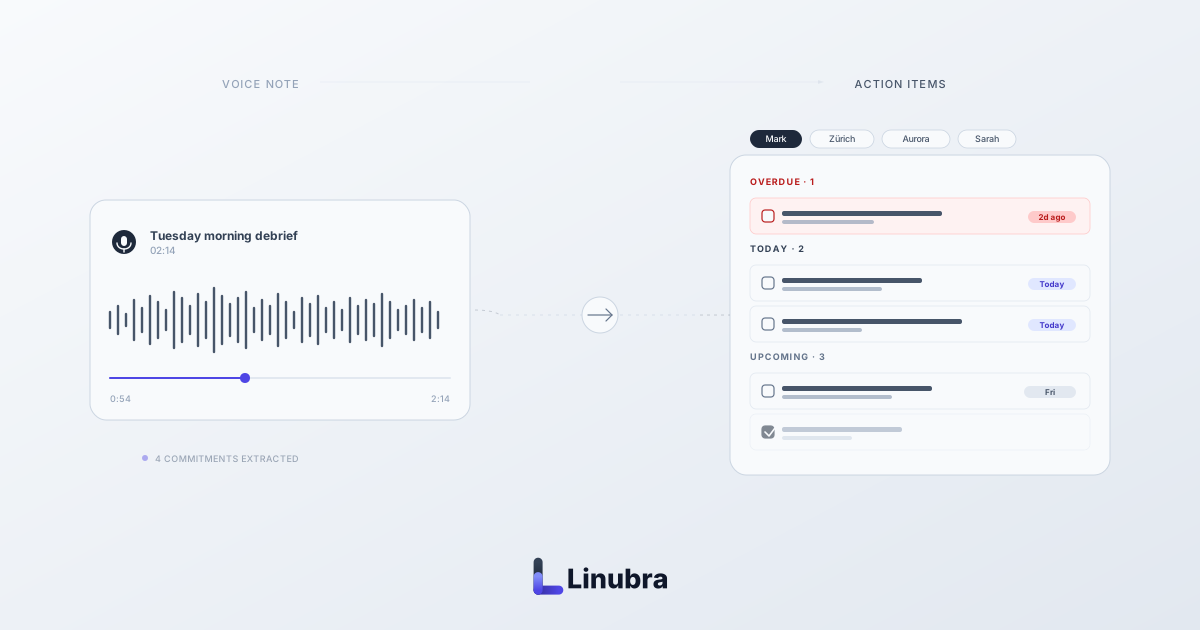
v4.0 gives those commitments their own place in the app. Open Linubra, tap Action Items, and there they are — every task you’ve ever said out loud, pulled out of every voice note, waiting for you.
Everything You Said, Grouped By When It’s Due
The first thing you see is five groups.
Overdue is at the top, in red, because that’s the part you actually need to look at right now. Today comes next. Then Upcoming for the things due later this week. No Date catches the “send Mark the deck” tasks that don’t have a when. Completed sits at the bottom, quietly keeping track of what you’ve already taken care of.
Each group opens or collapses on its own, depending on how much is in it. A short list stays open so you see everything. A long list folds up so you’re not drowning in it. Completed stays closed by default — it’s there for the satisfaction of opening it, not for daily reading.
The point of the grouping is simple. You rarely need all your tasks. You need the two or three that matter this morning. The dashboard is built to show you those first and hide the rest until you want them.
You can tick items off with a single tap. You can snooze something to tomorrow, to next week, or to a specific date you pick. You can add a new task without recording a voice note at all, just by typing it into the bar at the top of the page. And next to every item there’s a little back-arrow that takes you straight to the voice note that created it — the exact recording, queued up to the moment you said the words.
Filter By The Person It’s For
Above the groups there’s a row of pills — one for every person, project, or place you’ve made commitments about.
Tap Mark, and the whole page filters. Now you see only the things you said you’d do involving Mark. Nothing else. Tap Zürich office and you see everything tied to work there. Tap the pill again and the filter clears.
This is the feature I find myself using before 1:1s. Two minutes before a meeting with somebody, open Linubra, tap their pill. Every commitment you’ve made to that person, across every voice note from the last month, laid out by when it’s due. You walk in already knowing what you owe them.
The pill row only shows people you actually have open commitments to. If you’ve cleared everything for somebody, they disappear from the row until a new task for them comes up. A knowledge graph with 400 people in it would otherwise bury you in pills you don’t need today.
One Thing We Got Wrong In Week One
A launch post that pretends nothing went wrong is a launch post nobody believes.
We shipped a timezone bug. Items due “today” in Zürich would briefly roll into “overdue” after midnight, then jump back at 2am when the clock caught up. Users in other timezones saw the opposite. It only happened for a few hours around the day boundary, but those are exactly the hours you’re most likely to be checking things off before bed — so it caught people.
We fixed it in the first week. The action item dashboard now compares local dates, not UTC, so “today” always means today where you are. If you spotted it and reported it, thank you — it was a real help.
Where to Find It
Open Linubra on web or iOS. Tap Action Items in the menu. Everything you’ve ever said you’d do is already there — we ran the extraction across every existing voice note when v4.0 shipped, so you don’t have to re-record anything or wait for the dashboard to catch up.
If you’re new to Linubra and wondering what a voice note has to do with a to-do list in the first place, the origin story is the shortest version of the answer. The previous post in this series has the longer one. The About page has more on who built this and why. If you’re comparing options, the best voice journaling apps in 2025 is a useful starting point.
The plumber still hasn’t been called. But at least Linubra remembers that I said I would.